Managing work hours, payroll, invoices, and project tracking becomes easier when time is converted into decimal format. A Time to Decimal Calculator helps users quickly change hours and minutes into decimal numbers. Many businesses, freelancers, and employees use this tool every day to save time and reduce calculation errors.
Manual time conversion can become confusing. For example, 1 hour and 30 minutes is not 1.30 in decimal format. The correct decimal value is 1.5 hours. Many people make mistakes when they calculate this manually. The Time to Decimal Calculator removes confusion by providing instant and accurate results.
Companies often use decimal time for payroll systems. Freelancers also use decimal values when billing clients. Project managers track work hours more efficiently with decimal calculations. This tool works well for students, office workers, contractors, and remote employees.
The calculator is simple to use. Users only enter hours and minutes, and the tool converts the value automatically. Some calculators also convert decimal hours back into standard time format.
The Time to Decimal Calculator is useful for daily work, attendance records, and payment calculations. It improves accuracy and saves valuable time. That is why many businesses and individuals depend on it for better productivity and easier time management.
What Is a Time to Decimal Calculator?
A Time to Decimal Calculator is an online tool that converts regular time into decimal format. Standard time uses hours and minutes, while decimal time expresses the same value as a decimal number. This format is easier for payroll systems, accounting software, and billing calculations.
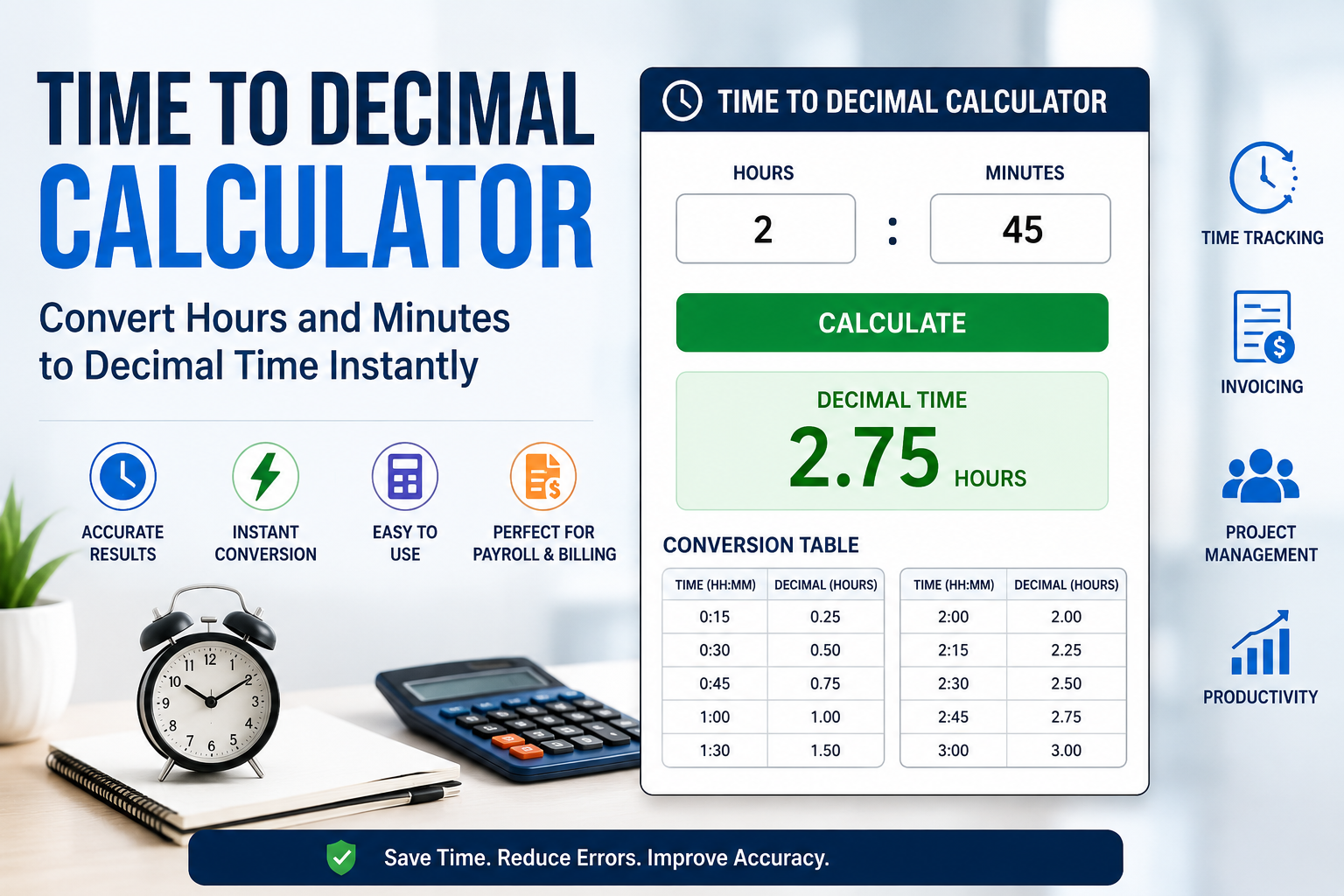
For example, 2 hours and 15 minutes becomes 2.25 hours in decimal form. The calculator performs this conversion instantly without manual math. This helps users avoid mistakes during calculations.
Many industries use decimal time because it simplifies hourly calculations. Payroll departments use it to calculate wages accurately. Freelancers use it to bill clients for exact working hours. Construction companies, consultants, and service providers also depend on decimal time systems.
The Time to Decimal Calculator works by dividing minutes by 60. Since one hour contains 60 minutes, the calculator converts the minute portion into a decimal value. The result is then added to the hour value.
Some calculators offer extra features like time rounding, overtime tracking, and reverse conversion. Reverse conversion changes decimal hours back into standard hours and minutes.
The tool is very simple to use. Users only enter time values, and the calculator handles the rest automatically. This makes the Time to Decimal Calculator useful for beginners and professionals alike.
Because businesses rely heavily on accurate time tracking, this calculator has become an important productivity tool in many workplaces.
How the Time to Decimal Calculator Works
The Time to Decimal Calculator uses a simple mathematical process to convert time into decimal format. Although the calculation is straightforward, many people prefer using a calculator because it is faster and more accurate.
The process starts with entering standard time values. Users input hours and minutes separately. The calculator then converts the minutes into a decimal by dividing them by 60.
For example:
| Standard Time | Decimal Time |
| 1:15 | 1.25 |
| 1:30 | 1.50 |
| 1:45 | 1.75 |
| 2:00 | 2.00 |
If someone works 3 hours and 45 minutes, the calculator divides 45 by 60. The result is 0.75. It then adds this to 3 hours, producing 3.75 hours.
The Time to Decimal Calculator performs these calculations instantly. Users do not need to memorize formulas or perform manual division. This reduces errors during payroll and billing tasks.
Some calculators also include advanced options. Users may round time values to the nearest quarter hour or tenth of an hour. Businesses often use these settings for payroll consistency.
The tool is especially useful when handling large amounts of time data. Companies with many employees can process hours much faster using decimal conversions.
Because speed and accuracy matter in time tracking, the Time to Decimal Calculator has become an essential tool in modern workplaces and freelance businesses.
Benefits of Using a Time to Decimal Calculator
The Time to Decimal Calculator provides many important benefits for businesses, employees, and freelancers. One of the biggest advantages is accuracy. Manual time conversion often leads to mistakes, especially when handling multiple entries. The calculator eliminates these errors.
Another major benefit is time savings. Instead of calculating decimal hours manually, users receive instant results. This improves productivity and reduces workload for payroll staff and managers.
The calculator also simplifies payroll processing. Most payroll software works better with decimal values instead of hours and minutes. The Time to Decimal Calculator ensures accurate wage calculations.
Freelancers benefit from the tool because clients are often billed by decimal hours. Correct calculations help maintain professional invoices and prevent payment disputes.
Project managers also use decimal time for work tracking. It becomes easier to calculate total project hours, labor costs, and employee productivity.
The table below highlights common benefits of using the calculator.
| Benefit | Description |
| Faster calculations | Saves time during conversion |
| Better accuracy | Reduces manual errors |
| Easy payroll processing | Simplifies wage calculations |
| Improved invoicing | Helps freelancers bill clients |
| Better productivity tracking | Makes time management easier |
The Time to Decimal Calculator is simple enough for anyone to use. Employees, business owners, accountants, and students can all benefit from its convenience and speed.
As businesses continue moving toward digital systems, decimal time conversion tools are becoming even more important for efficient operations.
Why Businesses Use Time to Decimal Calculators
Businesses rely heavily on accurate time tracking. The Time to Decimal Calculator helps companies manage employee hours, payroll, overtime, and billing more effectively.
Payroll processing is one of the biggest reasons businesses use decimal conversion tools. Payroll systems calculate wages based on decimal hours rather than standard hours and minutes. Manual conversions can create costly errors. The calculator ensures accurate employee payments.
Many companies also use time tracking software that requires decimal values. Employees clock in and out, and the system converts work hours into decimals automatically. This improves efficiency and reduces administrative work.
Freelance agencies and consulting firms also benefit from decimal time calculations. They often bill clients by hourly rates. Using decimal values creates cleaner invoices and easier calculations.
The Time to Decimal Calculator also helps businesses monitor overtime. Managers can quickly calculate extra hours worked and ensure compliance with labor rules.
Construction companies, healthcare providers, law firms, and remote teams all use decimal time systems. Accurate time records improve project management and budgeting.
Another reason businesses use the calculator is consistency. Standardized decimal values make reports easier to read and analyze. Financial teams can process data more efficiently.
Because modern workplaces depend on accurate records and digital systems, the Time to Decimal Calculator has become a valuable tool for many industries.
Common Uses of a Time to Decimal Calculator
The Time to Decimal Calculator is useful in many different situations. People from various industries use it daily for work and personal tasks.
Payroll processing is the most common use. Companies convert employee hours into decimals to calculate wages accurately. This helps payroll departments save time and reduce mistakes.
Freelancers and consultants also depend on decimal time conversion. Many clients pay based on hourly work. Decimal hours simplify invoice calculations and improve billing accuracy.
Project tracking is another major use. Managers often calculate total work hours spent on projects. Decimal values make budgeting and planning easier.
The calculator is also popular in education and training programs. Teachers and trainers may track attendance hours using decimal systems.
Healthcare workers sometimes use decimal time for scheduling and payroll. Construction companies use it for labor tracking and cost estimates.
The table below shows common uses of the calculator.
| Industry | Use |
| Payroll | Wage calculations |
| Freelancing | Client billing |
| Construction | Labor tracking |
| Healthcare | Staff scheduling |
| Education | Attendance tracking |
| Consulting | Project invoicing |
The Time to Decimal Calculator works well for both small and large organizations. Its flexibility makes it valuable in almost every industry that tracks time.
Because accurate time management improves productivity and financial planning, more businesses continue adopting decimal time systems.
Common Mistakes in Manual Time Conversion
Many people make mistakes when converting time manually. The Time to Decimal Calculator helps prevent these errors and ensures accurate results.
One common mistake is treating minutes like decimals directly. For example, some people think 1 hour and 30 minutes equals 1.30 hours. The correct decimal value is 1.50 because 30 minutes is half an hour.
Another mistake happens when people divide minutes incorrectly. Since there are 60 minutes in an hour, calculations must always use 60 as the base value.
Some workers also forget to round decimal values properly. Incorrect rounding can affect payroll and invoices. Even small mistakes may create payment issues over time.
Another issue is adding time incorrectly. Manual calculations become difficult when handling many entries. The Time to Decimal Calculator handles these calculations instantly and accurately.
The calculator also helps businesses avoid payroll disputes. Employees expect correct payments, and accurate time tracking reduces confusion.
People working under pressure often make conversion mistakes because they rush calculations. Automated tools remove this stress and improve confidence.
The Time to Decimal Calculator provides a reliable solution for anyone who works with time data regularly. It improves accuracy, saves time, and simplifies daily work tasks.
Best Practices for Using a Time to Decimal Calculator
Using the Time to Decimal Calculator correctly helps users achieve the best results. Although the tool is simple, following a few good practices improves accuracy and efficiency.
Users should always double-check entered hours and minutes before converting. Small typing mistakes can create incorrect payroll or billing totals.
It is also important to understand company rounding rules. Some businesses round to the nearest quarter hour, while others use exact decimal values. Following the correct method ensures consistency.
Freelancers should keep detailed records of work sessions before conversion. Accurate tracking improves invoices and client trust.
Businesses should train employees on proper time entry methods. This reduces errors and improves payroll accuracy. Many companies combine time tracking software with decimal conversion tools for better workflow management.
The Time to Decimal Calculator should also be used regularly instead of relying on manual calculations. Consistent use improves productivity and reduces stress during reporting periods.
Users who understand decimal time systems can work more efficiently and avoid common calculation mistakes.
FAQs About Time to Decimal Calculator
What is a Time to Decimal Calculator?
A Time to Decimal Calculator converts hours and minutes into decimal format for payroll, billing, and time tracking purposes.
How do you convert time into decimals?
The calculator divides minutes by 60 and adds the result to the total hours.
Why do businesses use decimal time?
Businesses use decimal time because it simplifies payroll, invoicing, and productivity tracking.
Is a Time to Decimal Calculator accurate?
Yes, the calculator provides fast and accurate conversions without manual calculation errors.
Can freelancers use a Time to Decimal Calculator?
Yes, freelancers often use decimal time for client billing and project tracking.